Implementing document version control best practices is the only way to guarantee that every single document leaving your business is accurate. If you were asked to guarantee that every single document leaving your business today is using the exact same approved template, could you do it? Could you also generate a new contract in under five minutes?
For many businesses operating on shared drives like SharePoint or Google Drive, file management is a source of low-level anxiety. Folders become graveyards of files named Contract_Final.docx, Contract_Final_v2.docx, and the dreaded Contract_Final_Dave_Edits.docx.
This isn’t just an organisational annoyance; it is a significant business risk. Relying on individuals to manually name and track documents is a recipe for errors that can damage client trust and expose the company to legal liability.
This guide covers core document version control best practices and how to move from file chaos to a guaranteed Single Source of Truth.
Why Document Version Control Best Practices Matter
Before we get to the solution, we must address why version control matters beyond just keeping tidy folders. If your business relies on accurate documentation to operate, document control is risk management.
When you fail to use document version control best practices and rely on manual versioning (asking employees to rename files by hand and manually adjust them), you expose the business to five specific risks:
1. Templates Saved to Desktop
An employee saves a critical document template to their desktop for easy access. You update the master version on the server, but that employee continues using the old, outdated version from their local machine for months without realising it.
2. Sending the Wrong Version
Nothing erodes professional trust faster than sending a client a document that contains errors corrected in a previous version, or worse, data belonging to a different client entirely. It signals incompetence and can kill deals instantly.
3. Failing an Audit
If a dispute arises, you need to prove exactly what was agreed upon and when. If you cannot produce a definitive, time-stamped history of a document’s evolution, your legal standing is severely weakened. In regulated sectors, this lack of control can lead to significant fines.
4. Broken Audit Trails
You know a document changed, but you don’t know why or who authorised it because the email thread where the decision was made is lost. When you need to reconstruct history, you hit a dead end.
5. Staff Saving Over Master Templates
A team member tweaks a clause in a standard Word document to push a project through quickly, inadvertently removing mandatory legal protections or changing approved standard wording.
5 Manual Document Version Control Best Practices
If you are not ready for an automated solution, you must implement rigid discipline to mitigate these risks.
To align with document version control best practices manually, you need to enforce these five pillars.
1. Standardised Naming Conventions
Never let employees name files based on intuition. You need a strict logic that groups files chronologically. The international standard (ISO 8601) suggests using the YYYY-MM-DD format at the start of the filename.
-
Bad:
Oct 12 Service Agreement.docx -
Good:
2023-10-12_ServiceAgreement_v0.1.docx
2. The Master vs Copy Rule
You must strictly enforce a rule that no one edits the Master file directly on the shared drive. They must download a copy, rename it immediately with the new version number, and move the old version to an Archive subfolder. This relies 100% on human discipline.
3. Manually Locking Text
To prevent rogue edits (Risk #5), you must use the Restrict Editing features within Microsoft Word to password-protect certain sections of your templates, ensuring only variable fields can be changed. This is often clunky to manage but necessary for control.
4. The Manual Version History Table
Every critical document needs a table on the second page that acts as its passport. It must manually track Version Number, Author Name, Approver Name, and a Summary of Changes. If a user forgets to update this table, your audit trail is broken.
5. Strict Storage Discipline
You must mandate that no business-critical documents ever reside on local C: drives or personal desktops. Everything must be saved immediately to the central server to ensure it is backed up and accessible to the wider team.
Automated Document Version Control Best Practices with Doc2
The manual pillars described above work, but they are fragile because they rely entirely on human perfection every single day.
Modern businesses are moving away from managing files and starting to manage content. This is where Doc2 changes the workflow. Doc2 automates document version control best practices by centralising control and removing the human margin for error.
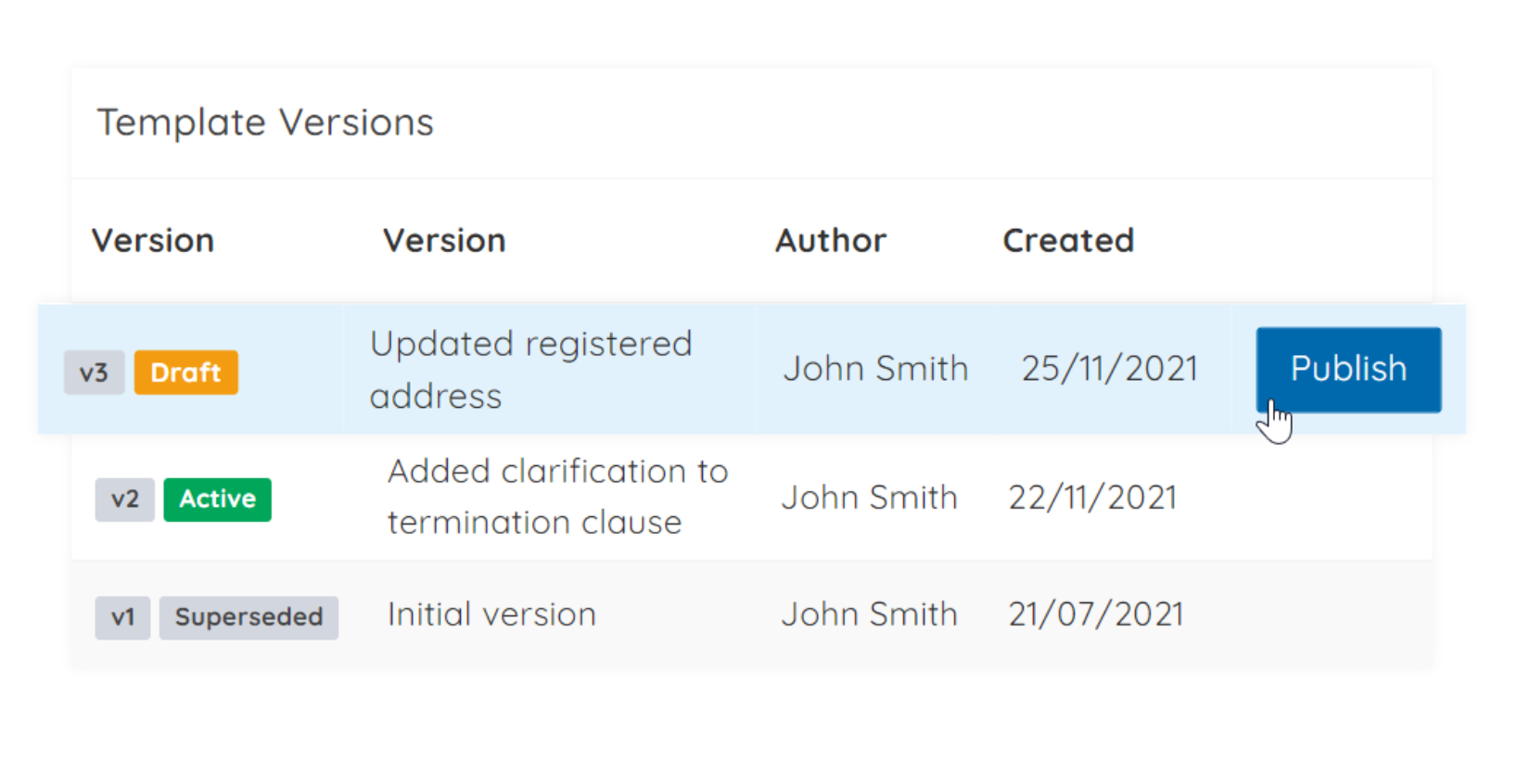
The Live Template Library: Instant Updates Without Renaming
With Doc2, you stop sending Word documents back and forth. You maintain a central Master Template.
-
Instant Propagation: When you update a template from v1.0 to v2.0, that change is instant for everyone.
-
No Renaming Required: The concept of naming conventions disappears for the end user. The system handles versioning automatically in the background.
Granular Content Locking: Preventing Unintended Edits
Instead of Word’s clunky Restrict Editing feature, Doc2 allows you to easily lock down your compliance clauses, legal text, and branding. Users can generate the document with necessary variable data (names, dates, values), but they are physically unable to alter the fixed wording.
Automated Audit Trails: The Future of Document Version Control Best Practices
Instead of relying on a user to manually type into a version history table or remember to save to the right server, Doc2 does it for them.
-
Zero Local Files: Documents are generated and stored directly in the cloud platform, never on a desktop.
-
Digital Passport: You have an automatic digital record of exactly when a document was generated, who generated it, and crucially which version of the template was used.
See it in action Don’t leave your compliance to chance. Discover how Doc2 records every user interaction, edit, and approval in our dedicated Audit Logs feature guide.

An example of setting a strict document naming policy within Doc2 to ensure every generated file follows the same standard convention automatically.
Who Needs Document Version Control Best Practices?
While version control is vital for any business, these document version control best practices are particularly critical for:
-
Legal Teams: Ensuring contracts remain standard and changes are tracked for liability purposes.
-
Compliance Teams: Maintaining unimpeachable audit trails for regulatory bodies.
-
Sales Operations: Ensuring reps are using current pricing structures and approved terms of business without needing to format documents manually.
-
General Operations: Standardising internal policies, procedures, and HR documentation across the company.
Conclusion: Implementing Document Version Control Best Practices
Version control is not about being bureaucratic; it is about protecting the business and ensuring consistency. Whether you choose to enforce strict manual discipline on your shared drive or upgrade to an automated governance platform like Doc2, the goal is the same: Control.